
In this day and age, having your website on speed dial is the direction of which communication and business operation is heading. It’s a way of keeping ahead of the game and ensuring your website is always on form, up to date and in full working order: which is important when it’s the face of your online business right?
Did you know you can save your website on the home screen of your smartphone or tablet? That’s right, your home screen isn’t just for apps, you can store not only your website, but all your favourite websites too- it’s easy!
Whether you use Apple or Android technology: your website can be forever at your fingertips. Here’s how:
Android:
Launch Chrome on your android device and type in your website URL, tap the menu icon and then ‘Add to home screen’. Enter your preferred name for the shortcut and wallah- you’re in business.
It’s as easy as that.
The icon looks like any other application on your home screen. You can drag, drop and file it like any other application on your device so you’re organised wherever in the world you may be.
Apple:
With the apple devices, saving your website to your home screen is just as simple. Launch Safari browser and navigate to the page you’d like to save.
Click the icon circled below:
These options will appear. 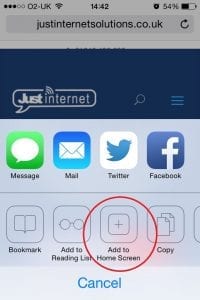 Tap the ‘add to home screen’ icon, choose your preferred name and hey presto, you’re all done!
You can save all your social network sites, news: anything you like. What’s more: saving webpages as shortcuts save memory on your phone which means more space for selfies, videos, music: whatever you want.
Just Internets no gibberish advice in technology, web design and marketing: all at your fingertips.